Introduction
Web scraping doesn’t always require complex setups or external libraries. Sometimes, the most elegant solution is right in your browser’s developer tools. As a Python developer and web scraping freelancer, I’ve discovered a powerful technique that lets you extract data from websites using nothing but JavaScript in your browser console.
Why Browser-Based Scraping? 🤔
Advantages:
• No Setup Required — Works instantly in any modern browser • Real-Time Testing — See results immediately as you code • DOM Access — Direct interaction with rendered content • No CORS Issues — Bypasses cross-origin restrictions • Multiple Export Formats — JSON, CSV, and Excel downloads • Perfect for Learning — Great way to understand web scraping fundamentals
The 4-Step Browser Scraping Process 📋
Step 1: Inspect the Target Website 🔍
Open Chrome DevTools (F12 or Ctrl+Shift+I) and analyze: • HTML structure of target elements • CSS selectors for data containers • Pagination or navigation patterns • Network requests and responses

Step 2: Identify Data Selectors 🎯
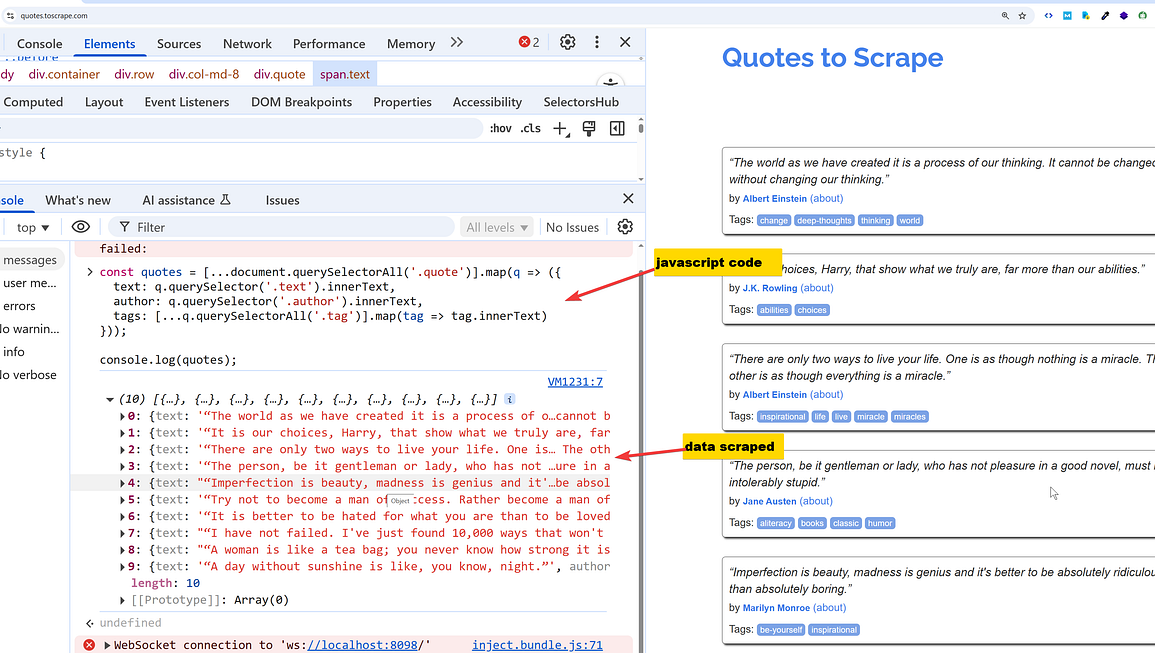
Use the Elements tab to find: • Quote containers: .quote class divs • Text content: .text selector for quote content • Author information: .author selector • Tags: .tags .tag for category labels • Navigation: .next > a for pagination links

Step 3: Execute JavaScript in Console ⚡
The magic happens in the Console tab where you run the scraping script.
Step 4: Download Extracted Data 💾
Automatically generate and download files in multiple formats.
Code Breakdown: The Complete Solution 💻
Here’s the JavaScript code that powers this browser-based scraping technique:
(async function scrapeAndDownloadQuotes() {
  const baseURL = "https://quotes.toscrape.com";
  let currentURL = "/";
  const allQuotes = [];

  // Pagination loop - scrapes all pages
  while (currentURL) {
    const response = await fetch(baseURL + currentURL);
    const html = await response.text();
    const tempDiv = document.createElement('div');
    tempDiv.innerHTML = html;

    // Extract quotes from current page
    const quoteDivs = tempDiv.querySelectorAll('.quote');
    quoteDivs.forEach(quoteDiv => {
      const quoteText = quoteDiv.querySelector('.text')?.innerText.trim();
      const author = quoteDiv.querySelector('.author')?.innerText.trim();
      const tags = Array.from(quoteDiv.querySelectorAll('.tags .tag'))
                    .map(tag => tag.innerText.trim());

      allQuotes.push({
        quote: quoteText,
        author: author,
        tags: tags.join(", ")
      });
    });

    // Find next page link
    const nextLink = tempDiv.querySelector('.next > a');
    currentURL = nextLink ? nextLink.getAttribute('href') : null;
  }

  // Multiple download formats implementation
  // [Download functions for JSON, CSV, and Excel]
})();
Key Features Explained 🔧
Asynchronous Pagination Handling
• Fetch API: Makes HTTP requests to each page • DOM Parsing: Creates temporary div elements for HTML parsing
• Loop Control: Continues until no “next” button is found • Error Handling: Graceful handling of missing elements
Multi-Format Export System
• JSON Export: Clean, structured data for APIs • CSV Export: Spreadsheet-compatible with proper escaping • Excel Export: Uses SheetJS library for .xlsx files • Automatic Downloads: Files download immediately when ready
Data Extraction Logic
• Text Cleaning: Removes extra whitespace and formatting • Tag Aggregation: Combines multiple tags into comma-separated strings • Null Safety: Uses optional chaining (?.) to prevent errors
Best Practices & Tips 💡
Performance Optimization:
• Minimal DOM Manipulation — Creates temporary containers efficiently • Async/Await Pattern — Prevents blocking the browser UI • Memory Management — Cleans up temporary elements
Data Quality:
• CSV Escaping — Properly handles quotes and special characters • Consistent Formatting — Maintains data structure across formats • Validation — Checks for element existence before extraction
Browser Compatibility:
• Modern JavaScript — Uses ES6+ features for cleaner code • CDN Integration — Loads external libraries on-demand • Cross-Browser Support — Works in Chrome, Firefox, Safari, Edge
When to Use This Technique 🎯
Ideal Scenarios:
• Quick Data Extraction — One-time scraping tasks • Learning Projects — Understanding web scraping concepts • Prototype Development — Testing scraping logic before building tools • Small Datasets — Sites with manageable amounts of data • Client-Side Rendering — When traditional scrapers can’t access dynamic content
Limitations to Consider:
• Browser Memory — Large datasets may cause performance issues • Manual Execution — Requires human intervention to run • Session Dependency — Doesn’t work with login-required content • Scale Limitations — Not suitable for continuous or large-scale scraping
Advanced Techniques 🚀
Enhanced Error Handling:
try {
  // Scraping logic with retry mechanisms
  const response = await fetch(url);
  if (!response.ok) throw new Error(`HTTP ${response.status}`);
} catch (error) {
  console.log(`Retry attempt for: ${url}`);
}
Rate Limiting:
// Add delays between requests
await new Promise(resolve => setTimeout(resolve, 1000));
Dynamic Content Handling:
// Wait for dynamic content to load
await new Promise(resolve => setTimeout(resolve, 2000));
Conclusion 🎉
Browser-based web scraping offers a powerful, accessible approach to data extraction that requires no additional software or complex setups. This technique bridges the gap between manual data collection and full-scale scraping applications, making it perfect for developers, researchers, and anyone needing quick access to web data.
The combination of modern JavaScript features, browser APIs, and creative problem-solving creates a robust solution that demonstrates the versatility of web technologies. Whether you’re a seasoned developer or just starting your scraping journey, mastering these browser-based techniques will add a valuable tool to your data extraction toolkit.