Web Scraping with Python
A complete technical reference — tools, patterns, ethics & code
5
core libraries
3
scraper types
6
pipeline stages
4
legal principles
What is web scraping?
Automated extraction of data from websites
Web scraping is the process of programmatically fetching web pages and extracting structured data from HTML, JSON, or XML content. Python is the dominant language for scraping due to its rich ecosystem of HTTP clients, HTML parsers, and browser automation tools.
When to use each approach
Static HTML
requests + BeautifulSoup
Content already present in raw HTML. No JavaScript execution needed. Fast, lightweight, ideal for most news sites, Wikipedia, forums.
JS-rendered
Selenium / Playwright
Content loaded by JavaScript after page load — SPAs, infinite scroll, AJAX-driven tables. Needs a real or headless browser.
Large scale
Scrapy framework
Multi-page crawling with link following, pipelines, item validation, rate limiting, and distributed crawling support out of the box.
API-first
Direct API calls
Many sites expose undocumented internal APIs the browser calls via XHR/Fetch. Inspecting DevTools Network tab often reveals cleaner endpoints.
Core flow — click a step for detail
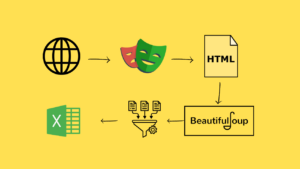
1
Request
HTTP GET/POST
›
2
Parse
HTML / JSON
›
3
Extract
CSS / XPath
›
4
Clean
regex / strip
›
5
Store
CSV / DB / API
Click a step above to learn more
Each stage of the scraping pipeline has its own tools and best practices.
Library comparison
| Library | Renders JS | Speed | Best for | Install |
|---|---|---|---|---|
| requests | ✗ | Very fast | HTTP fetch, APIs | pip install requests |
| BeautifulSoup4 | ✗ | Fast | HTML/XML parsing | pip install beautifulsoup4 |
| lxml | ✗ | Very fast | XPath, large docs | pip install lxml |
| Scrapy | ✗ | Fast async | Large crawls, pipelines | pip install scrapy |
| Selenium | ✓ | Slow | Legacy JS sites | pip install selenium |
| Playwright | ✓ | Moderate | Modern SPAs, async | pip install playwright |
| httpx | ✗ | Very fast | Async HTTP, HTTP/2 | pip install httpx |
Selector types — click to compare
CSS selector
XPath
Regex
JSON / jmespath
CSS selector
Familiar from web dev. Supported natively by BeautifulSoup and Playwright.
soup.select(‘table.results tr td:nth-child(2)’)
soup.select_one(‘h1.title’).get_text(strip=True)
soup.select(‘a[href^=”/product/”]’)
Anti-blocking techniques
Rotate User-Agents
Send realistic browser headers. Use the
fake-useragent library to cycle headers per request.Rate limiting
Add random delays between requests:
time.sleep(random.uniform(1, 3)) — mimics human browsing pace.Proxy rotation
Route requests through rotating residential or datacenter proxies to avoid IP bans on high-volume scraping.
Session handling
Use
requests.Session() to persist cookies across requests — required for sites behind login walls.Pattern 1 — static HTML scraper
import requests
from bs4 import BeautifulSoup
import time, random
headers = {“User-Agent”: “Mozilla/5.0 (compatible; MyBot/1.0)”}
session = requests.Session()
session.headers.update(headers)
def scrape_page(url):
resp = session.get(url, timeout=10)
resp.raise_for_status() # raises on 4xx / 5xx
soup = BeautifulSoup(resp.text, “lxml”)
return soup
soup = scrape_page(“https://books.toscrape.com/”)
books = soup.select(“article.product_pod”) # CSS selector
for book in books:
title = book.select_one(“h3 a”)[“title”]
price = book.select_one(“p.price_color”).text.strip()
rating = book.select_one(“p.star-rating”)[“class”][1]
print(f“{title} | {price} | {rating}”)
time.sleep(random.uniform(0.5, 1.5))
Pattern 2 — async multi-page (httpx + asyncio)
import asyncio, httpx
from bs4 import BeautifulSoup
async def fetch(client, url):
r = await client.get(url, timeout=15)
return r.text
async def main(urls):
async with httpx.AsyncClient() as client:
tasks = [fetch(client, u) for u in urls]
pages = await asyncio.gather(*tasks)
return pages
urls = [f“https://example.com/page/{i}” for i in range(1, 6)]
pages = asyncio.run(main(urls)) # fetches all 5 concurrently
Pattern 3 — JS-rendered with Playwright
from playwright.sync_api import sync_playwright
with sync_playwright() as p:
browser = p.chromium.launch(headless=True)
page = browser.new_page()
page.goto(“https://spa-site.example.com”)
page.wait_for_selector(“table.data-loaded”) # wait for JS render
rows = page.query_selector_all(“table tr”)
for row in rows:
cells = [td.inner_text() for td in row.query_selector_all(“td”)]
print(cells)
browser.close()
Pattern 4 — save to CSV
import csv
data = [{“title”: “Book A”, “price”: “£9.99”}] # your scraped list
with open(“results.csv”, “w”, newline=“”, encoding=“utf-8”) as f:
writer = csv.DictWriter(f, fieldnames=[“title”, “price”])
writer.writeheader()
writer.writerows(data)
Production scraping pipeline
1. Discover
Sitemap.xml, seed URLs, link following. Tools: Scrapy Spider, urllib.robotparser
2. Fetch
HTTP GET with retries, timeout, session cookies, proxy rotation, rate-limit delays
3. Render
For JS sites only: headless Chrome via Playwright. For static: skip this stage
4. Parse
BeautifulSoup / lxml (HTML) · json.loads (APIs) · pdfplumber (PDFs)
5. Clean
strip whitespace · normalise dates · validate types · deduplicate records
6. Store
CSV (csv) · SQLite (sqlite3) · PostgreSQL (psycopg2) · MongoDB (pymongo)
Error handling pattern
import time, requests
def fetch_with_retry(url, retries=3, backoff=2):
for attempt in range(retries):
try:
r = requests.get(url, timeout=10)
r.raise_for_status()
return r
except requests.HTTPError as e:
if e.response.status_code == 429: # rate-limited
time.sleep(backoff ** attempt)
elif e.response.status_code == 404:
return None # skip missing pages
else:
raise
except requests.RequestException:
time.sleep(backoff ** attempt)
return None
Common HTTP status codes
200
OK
Request succeeded. Proceed to parse.
301/302
Redirect
requests follows automatically. Check final URL.
403
Forbidden
Headers/auth problem. Add User-Agent or cookies.
404
Not Found
Skip silently; log URL for review.
429
Rate Limited
Back off and retry with exponential delay.
503
Server Error
Retry later. Server may be overloaded.
Legal & ethical principles
-
Respect robots.txtAlways parse and honour the site’s robots.txt before crawling. Python:
urllib.robotparser.RobotFileParser. Disallowed paths must not be fetched. -
Rate limit your requestsDo not hammer servers. Add at least 1–2 s random delay between requests. High-volume scraping can degrade service for real users — a legal liability in many jurisdictions.
-
Check the Terms of ServiceMany sites explicitly prohibit automated scraping in their ToS. Violating ToS may constitute breach of contract, even if data is publicly visible. Prefer official APIs when available.
-
Personal data & copyrightUnder GDPR (EU) and similar laws, scraping personal data without lawful basis is illegal. Scraped content remains copyrighted by its authors — re-publishing without permission may infringe copyright.
robots.txt check — code
from urllib.robotparser import RobotFileParser
rp = RobotFileParser()
rp.set_url(“https://example.com/robots.txt”)
rp.read()
if rp.can_fetch(“*”, “https://example.com/products”):
print(“Allowed — proceeding”)
else:
print(“Disallowed by robots.txt — skipping”)
Use the official API when one exists
Many services (Twitter/X, Reddit, GitHub, Google Maps, OpenWeatherMap) provide free or paid APIs that are faster, more reliable, and legally unambiguous compared to scraping. Always check for a public API before building a scraper. Scraping should be a last resort when no API exists.
GDPR
CFAA (US)
robots.txt
Terms of Service
Copyright law
Rate limiting