Prerequisites: Comfortable with Python
requests, basic understanding of how HTTPS works (TLS handshake, not just HTTP).
The Problem
Indeed, LinkedIn, Cloudflare-protected sites, and hundreds of others run bot detection that fires before your HTTP headers are even read. Python’s requests library uses a TLS stack that produces a JA3 fingerprint — a hash of your cipher list, TLS extensions, and elliptic curves — that has been publicly documented as non-browser traffic for years. Swapping the User-Agent to "Mozilla/5.0 ..." does exactly nothing. The TLS layer already gave you away.
curl_cffi wraps curl-impersonate, a patched build of libcurl that replays the exact TLS handshake each major browser sends — cipher suites, extension order, ALPN negotiation, HTTP/2 settings frames — all of it.

How It Works
Your script
    │
    ├──► requests + urllib3
    │         │
    │         └──► Python TLS stack
    │                   │
    │                   └──► JA3 = known bot hash ──► 403 / CAPTCHA
    │
    └──► curl_cffi (impersonate="chrome120")
              │
              └──► curl-impersonate TLS
                        │
                        └──► JA3 matches real Chrome ──► 200 OK
The server’s bot-detection layer checks the JA3 hash on the TLS handshake. Everything after that — headers, cookies, payload — only matters if you pass this first gate.
The Code
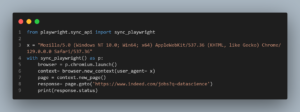
from curl_cffi import requests

# Drop-in replacement for requests.Session
session = requests.Session(impersonate="chrome120")

# Targeting a real site — note: always respect robots.txt and ToS
r = session.get(
    "https://httpbin.org/headers",
    timeout=15,
)

# Inspect what the server received
print(r.json()["headers"])

# Async variant for bulk scraping — same impersonate flag
from curl_cffi.requests import AsyncSession
import asyncio

async def fetch(url):
    async with AsyncSession(impersonate="chrome120") as s:
        resp = await s.get(url, timeout=15)
        return resp.status_code

print(asyncio.run(fetch("https://httpbin.org/get")))impersonate="chrome120"tells curl_cffi to load a pre-built TLS profile that matches Chrome 120’s exact handshake fingerprint — not just the cipher list, but extension order and HTTP/2 SETTINGS frame values.- The sync API is a near-complete drop-in for
requests—session.get,session.post,session.cookies, andsession.headersall work as expected. - The async variant uses
AsyncSessionand standardasyncio— noaiohttprequired. httpbin.org/headersis the fastest way to confirm your request looks like a browser: check thatAccept-Language,Sec-Fetch-*, and the correctUser-Agentare present.- Available profiles as of 2024:
chrome99,chrome107,chrome110,chrome116,chrome120,firefox117,safari15_5,edge99. Pick the newest Chrome unless you have a reason not to.
Watch Out For This
Wrong — header spoofing only:
import requests

session = requests.Session()
session.headers.update({
    "User-Agent": "Mozilla/5.0 (Windows NT 10.0; Win64; x64) ...",
    "Accept-Language": "en-US,en;q=0.9",
})
r = session.get("https://books.toscrape.com")
This fails on any site using JA3/JA3S fingerprinting. The User-Agent header travels inside the TLS tunnel — the server’s bot-detection system already logged your Python cipher list before it opened the envelope.
Right — impersonate at the transport layer:
from curl_cffi import requests

session = requests.Session(impersonate="chrome120")
r = session.get("https://books.toscrape.com")
One flag replaces the entire TLS profile. The server sees a handshake indistinguishable from Chrome 120 running on Windows.
Bottom Line
Bot detection lives at the TCP handshake level — if your TLS stack doesn’t look like a browser, no amount of header spoofing saves you.
Further reading: JA3 TLS fingerprinting (Salesforce Engineering), curl-impersonate project (GitHub), HTTP/2 fingerprinting (AKAMAI research)