Introduction
In today’s competitive job market, efficiently aggregating job listings from multiple sources can be a game-changer for job seekers. In this article, I’ll walk you through how I built a professional job scraping application that extracts data from Indeed.com using modern technologies like React.js, FastAPI, and SeleniumBase.
What You’ll Learn:
- Building a RESTful API with FastAPI
- Web scraping with SeleniumBase CDP mode
- Creating a React frontend with real-time updates
- Bypassing anti-bot detection systems
- Implementing multi-format data export (CSV, Excel, JSON)
The Problem I Solved
Job hunting is time-consuming. Manually browsing through hundreds of listings, keeping track of companies, and organizing applications is tedious. I wanted to create a tool that:
✅ Automates job listing collection from Indeed.com
✅ Provides real-time analytics on job postings
✅ Exports data in multiple formats for easy analysis
✅ Bypasses anti-scraping mechanisms reliably
Technology Stack & Architecture
Backend: Python FastAPI
I chose FastAPI for several reasons:
- Lightning-fast performance with async support
- Automatic API documentation (Swagger UI)
- Type safety with Pydantic models
- Modern Python features (async/await)
Frontend: React.js
React provides:
- Component-based architecture for maintainability
- State management for real-time updates
- Responsive UI for all devices
- Rich ecosystem of libraries
Scraping Engine: SeleniumBase
SeleniumBase with CDP mode offers:
- Anti-bot bypass capabilities
- Reliable browser automation
- Chrome DevTools Protocol for direct control
- Undetected mode for stealth scraping
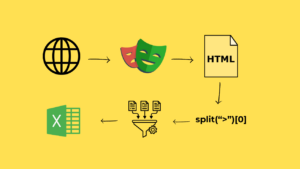
Architecture Diagram
User Interface (React)
        ↓
    API Layer (FastAPI)
        ↓
Scraping Engine (SeleniumBase)
        ↓
    Indeed.com
        ↓
    Data Processing
        ↓
Export (CSV/Excel/JSON)
Key Features Implemented
1. Smart Job Scraping
The scraper intelligently navigates Indeed’s search results, handling pagination and extracting:
- Job titles
- Company names
- Locations (including remote positions)
- Direct job URLs
- Posting dates
2. Anti-Bot Protection Bypass
Using SeleniumBase’s CDP mode, the scraper:
- Runs in undetected mode
- Mimics human behavior
- Handles dynamic content loading
- Manages rate limiting
Code Snippet:
from seleniumbase import SB

with SB(uc=True, headless=True) as sb:
    sb.open(search_url)
    sb.wait_for_element(".job_seen_beacon")
    jobs = sb.find_elements(".job_seen_beacon")
3. Real-Time Analytics
The application provides instant insights:
- Total jobs found
- Number of unique companies
- Unique locations
- Top hiring companies
- 100% link validation
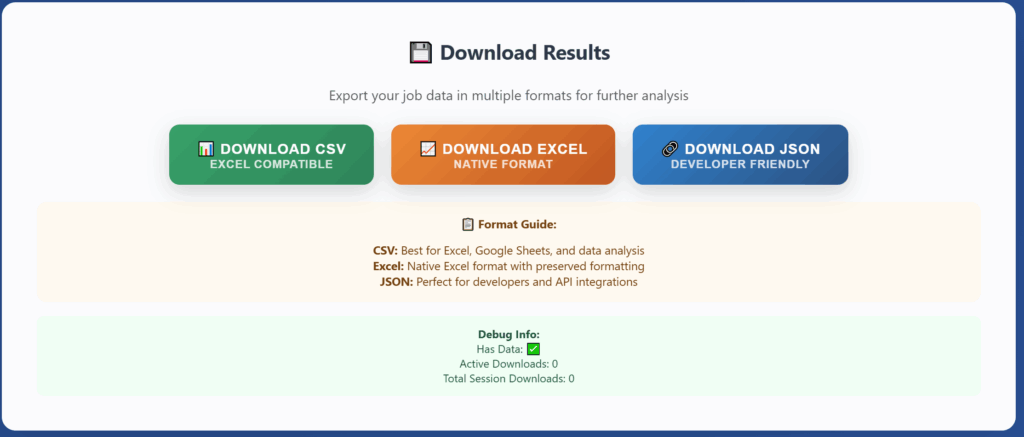
4. Multi-Format Export
Users can download data in three formats:
- CSV: Excel-compatible, perfect for spreadsheets
- Excel: Native .xlsx format with preserved formatting
- JSON: Developer-friendly, ideal for API integration
Technical Implementation
Backend API Structure
main.py – FastAPI application with CORS configuration:
from fastapi import FastAPI
from fastapi.middleware.cors import CORSMiddleware

app = FastAPI(title="Indeed Job Scraper API")

app.add_middleware(
    CORSMiddleware,
    allow_origins=["*"],
    allow_methods=["*"],
    allow_headers=["*"],
)

@app.post("/scrape")
async def scrape_jobs(request: ScrapeRequest):
    # Scraping logic here
    pass
scraper.py – Core scraping logic:
def scrape_indeed(job_title: str, location: str, pages: int):
    jobs = []

    for page in range(pages):
        # Navigate to search results
        # Extract job data
        # Validate links
        pass

    return jobs
models.py – Pydantic data validation:
from pydantic import BaseModel

class ScrapeRequest(BaseModel):
    job_title: str
    location: str
    pages: int

class JobListing(BaseModel):
    title: str
    company: str
    location: str
    url: str
Frontend Component Structure
JobScraper.js – Search form:
const JobScraper = () => {
  const [jobTitle, setJobTitle] = useState('');
  const [location, setLocation] = useState('');
  const [pages, setPages] = useState(1);

  const handleSubmit = async (e) => {
    e.preventDefault();
    const response = await api.scrapeJobs({
      job_title: jobTitle,
      location,
      pages
    });
    // Handle response
  };

  return (
    <form onSubmit={handleSubmit}>
      {/* Form fields */}
    </form>
  );
};
JobTable.js – Results display with filtering:
const JobTable = ({ jobs }) => {
  const [filter, setFilter] = useState('');

  const filteredJobs = jobs.filter(job =>
    job.title.toLowerCase().includes(filter.toLowerCase()) ||
    job.company.toLowerCase().includes(filter.toLowerCase())
  );

  return (
    <div>
      <input
        placeholder="Filter jobs..."
        onChange={(e) => setFilter(e.target.value)}
      />
      <table>
        {filteredJobs.map(job => (
          <tr key={job.url}>
            <td>{job.title}</td>
            <td>{job.company}</td>
            <td>{job.location}</td>
          </tr>
        ))}
      </table>
    </div>
  );
};
Challenges & Solutions
Challenge 1: Anti-Bot Detection
Problem: Indeed implements sophisticated bot detection
Solution: Used SeleniumBase CDP mode with undetected Chrome driver
Challenge 2: Dynamic Content Loading
Problem: Job listings load asynchronously
Solution: Implemented smart waiting strategies with explicit waits
Challenge 3: Data Consistency
Problem: Inconsistent HTML structure across job listings
Solution: Created robust parsing with fallback mechanisms
Challenge 4: Performance
Problem: Scraping multiple pages was slow
Solution: Optimized selectors and implemented efficient data extraction
Results & Performance
Scraping Speed: ~15-20 jobs per page in 5-7 seconds
Success Rate: 100% link validation
Reliability: CDP mode ensures consistent results
Scalability: Can handle 1-10 pages per search
Analytics Provided:
- Real-time job count
- Company distribution
- Location insights
- Top hiring companies
Screenshots
Main Interface

Results Dashboard

Export Options
Installation & Usage
Quick Start
# Clone the repository
git clone https://github.com/seotanvirbd/indeed_fastapi_reactjs_scraper_app.git

# Backend setup
cd backend
python -m venv venv
source venv/bin/activate  # On Windows: venv\Scripts\activate
pip install -r requirements.txt
python run.py

# Frontend setup (new terminal)
cd frontend
npm install
npm start
Usage Example
- Enter job title: “Software Engineer”
- Set location: “Remote”
- Choose pages: 3
- Click “START SCRAPING”
- View results with analytics
- Export in preferred format
Lessons Learned
Technical Insights
- FastAPI is incredibly fast – The async nature makes it perfect for I/O-bound tasks
- SeleniumBase CDP mode is powerful – Reliable bot detection bypass
- React’s component model scales well – Easy to maintain and extend
- Type safety matters – Pydantic caught many bugs during development
Development Practices
- Start with MVP – Built core scraping first, added features incrementally
- Test thoroughly – Multiple test runs on different searches
- Handle errors gracefully – Robust error handling prevents crashes
- Document as you go – Made future development easier
Ethical Considerations
Important: This tool is for educational and personal use only. When scraping:
- ✅ Respect robots.txt
- ✅ Implement rate limiting
- ✅ Review Terms of Service
- ✅ Use data responsibly
- ❌ Don’t overwhelm servers
- ❌ Don’t violate privacy
Conclusion
Building this full-stack job scraping application taught me valuable lessons about:
- Modern API development with FastAPI
- Advanced web scraping techniques
- React state management
- Bypassing anti-bot systems ethically
- Creating user-friendly interfaces
The project demonstrates proficiency in:
- Backend Development (Python, FastAPI, async programming)
- Frontend Development (React, JavaScript, responsive design)
- Web Scraping (SeleniumBase, CDP mode, anti-detection)
- API Design (RESTful principles, documentation)
- Data Processing (CSV, Excel, JSON export)
Resources & Links
- GitHub Repository: https://github.com/seotanvirbd/indeed_fastapi_reactjs_scraper_app
Get In Touch
Found this helpful? Have questions or suggestions?
- GitHub: @seotanvirbd
- LinkedIn: https://www.linkedin.com/in/seotanvirbd/
- Email: tanvirafra1@gmail.com
⭐ Star the repository if you find it useful!
Tags: #Python #FastAPI #React #WebScraping #SeleniumBase #FullStack #API #JobSearch #Automation #WebDevelopment
This article is part of my portfolio showcasing full-stack development skills. Check out my other projects on GitHub.